Top 10 AI Coding Agents for Higher Productivity
AI coding agents have moved well beyond autocomplete. They read a codebase, plan a change across multiple files, execute it using real development tools — terminal, editor, browser — and iterate on the result until tests pass. This article is an effort to summarize the top ten AI coding agents for higher developer productivity, considering maturity of the product, depth of autonomy, and fit for day-to-day engineering work rather than experimental demos.
Please note that these are not mutually exclusive — most engineering teams end up running two or three side by side (a terminal-first agent for deep autonomous work, and an IDE-integrated one for daily editing) rather than standardizing on a single tool. The recommendation is to use a context-based decision, similar to selecting any other engineering tool.
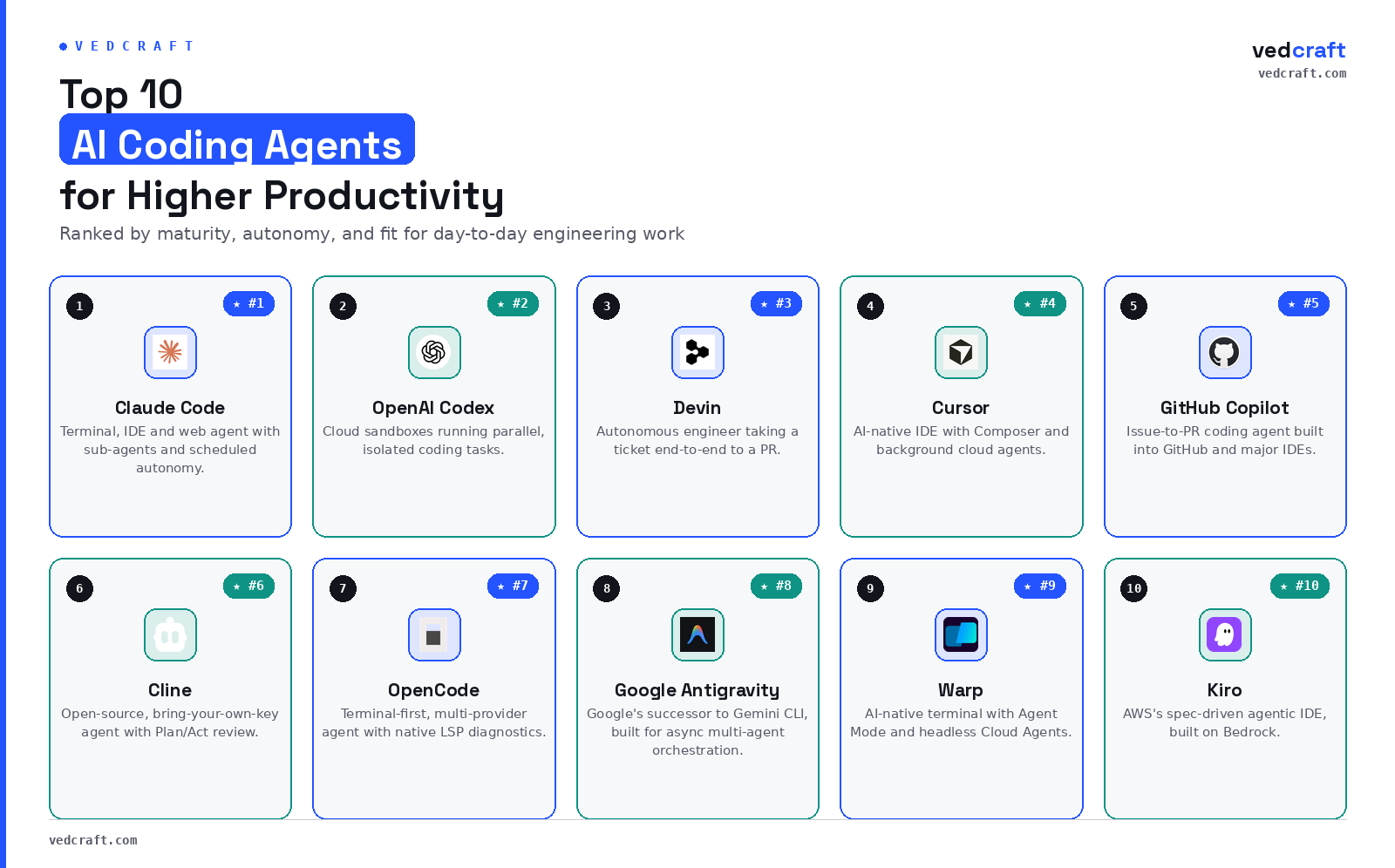
Quick Comparison
| Tool | Interface | Key strength | Best for |
|---|---|---|---|
| Claude Code | Terminal + IDE + Web | Most widely used, multi-agent workflows, feature-heavy, Rapid innovation | Power users, Complex Apps |
| OpenAI Codex | Cloud agent + App/CLI | Cloud sandboxes, parallel tasks, close competitor, Enterprise GTM Strategy | Hosted, isolated execution |
| Devin | Cloud + IDE | Highest autonomy, end to end ticket execution, Enterprise-focused, Regulation-heavy | Delegating full tickets |
| Cursor | AI-native IDE | Multi file editing, background and cloud agents, Developer-focused, Enterprise-scale | Daily driver IDE |
| GitHub Copilot | IDE + Terminal + Cloud | Issue to PR automation, terminal agent, Cost-effective Pricing Strategy | GitHub centric workflows |
| Cline | VS Code / JetBrains / CLI | Open source, Plan and Act human in the loop | OSS first, BYOK teams |
| OpenCode | Terminal + Desktop + IDE | Multi provider, native LSP diagnostics | Terminal Power Users |
| Antigravity | Terminal CLI + Desktop + IDE | Async multi agent orchestration in Google, Enterprise-ready | Google Ecosystem |
| Warp | AI-native Terminal (Multi-agent) | Agent Mode, headless Cloud Agents, MCP | Terminal-focus, Linux user friendly |
| Kiro | Terminal CLI + IDE | Spec driven development on Bedrock | AWS shops, Spec-first flows |
License, Pricing, and Extensibility
Beyond interface and autonomy, licensing model, entry cost, and how far each tool lets you bring your own model (BYOM) or connect external tools via Model Context Protocol (MCP) matter for adoption decisions, particularly for teams with compliance or vendor lock concerns.[file:163]
| Tool | License | Entry cost | BYOM | MCP support | Sandboxed execution |
|---|---|---|---|---|---|
| Claude Code | Proprietary | Included with Claude and Anthropic plans | Partial, via MCP and tool servers | Yes | Yes, cloud sandboxes and worktrees |
| OpenAI Codex | Proprietary | Included with ChatGPT plans; pay per use via API | Limited | Emerging | Yes, isolated cloud containers |
| Devin | Proprietary | Free tier; Pro from roughly 20 USD per month | Limited | No, custom stack | Yes, isolated editor, terminal and browser |
| Cursor | Proprietary | Free Hobby; Pro from roughly 20 USD per month | Limited, Auto mode | Emerging | Yes, background and cloud agents |
| GitHub Copilot | Proprietary | Included in paid Copilot tiers | Limited | Yes | Yes, repo level CI/CD execution |
| Cline | Apache 2.0 (open source) | Free, bring your own key | Yes, 30 plus providers including local models | Yes | No built in sandboxes, runs in your environment |
| OpenCode | MIT (open source) | Free, model and API costs only | Yes, 75 plus providers | Yes | No built in sandboxes, runs in your environment |
| Antigravity CLI | Proprietary | CLI binary free; Gemini usage billed via Google AI pricing | Limited, primarily Gemini models | Yes, via Antigravity plugins and MCP | Yes, shared harness with cloud sandboxes |
| Warp | Proprietary | Terminal free; AI credits from roughly 18 USD per month | Yes, bring your own model | Yes | Yes, Cloud Agents |
| Kiro | Proprietary | Free tier; Pro from roughly 20 USD per month | Partial, via Bedrock routing | Yes | Yes, cloud and local execution via Bedrock |
#10 — Kiro
Kiro is AWS’s agentic IDE, built on Code OSS and positioned as the successor to Amazon Q Developer.
Key features:
- Spec-driven development: Natural-language specifications, not code, are treated as the source of truth. Kiro generates
requirements.md,design.md, andtasks.mdbefore writing any code, enforcing a structured review step before implementation begins. - Event-driven hooks: Fire on file saves, PR events, and repo changes to keep specs and generated code in sync.
- Multi-model routing on Bedrock: Routes reasoning-heavy specs to Claude and high-throughput generation to Amazon Nova.
Suitable Scenarios:
- AWS-centric teams that want spec-driven development, with requirements, design, and tasks treated as first-class artifacts.
- Organizations migrating off Amazon Q Developer to a more structured, Bedrock-powered IDE.
- Enterprises that want hooks on repo events (PR open, file save) to trigger tests, docs updates, or fixtures automatically.
#9 — Warp
Warp is an AI-native terminal built around agents as a core primitive, rather than a shell with AI features layered on top.
Key features:
- Agent Mode: Runs multi-step coding tasks directly in the terminal — generating commands, debugging failures, and executing workflows from natural language.
- Cloud Agents: Run headlessly in the background, reacting to webhooks, CI/CD events, or Slack messages without a developer at the keyboard.
- MCP support: Lets agents reach into databases, services, and internal tools as part of terminal workflows.
Suitable Scenarios:
- Developers who treat the terminal as their main UI and want Agent Mode to automate multi-step shell workflows — build, deploy, debug.
- Teams wiring agentic flows to CI/CD, webhooks, or Slack via Cloud Agents and MCP servers from a cross-platform terminal.
- Anyone who wants their terminal to become an IDE-like agent surface, with proactive command-fix suggestions based on exit codes and shell history.
#8 — Antigravity
Antigravity is Google’s successor to Gemini CLI and provides an agentic platform ecosystem. It takes a single prompt workflow and stretches it into async multi agent orchestration across the command line, a standalone desktop app, an SDK, and an IDE surface that share one harness.[web:68][web:72][web:73]
In practice, Antigravity CLI gives you a multi agent fabric on top of Gemini models. You can kick off several long running tasks in parallel, watch their progress from the terminal or desktop, and let agents coordinate through shared skills, hooks, and plugins rather than one chat session.[web:68][web:72]
Key features
- Async multi agent orchestration. You can start several agent tasks, each with its own skill set and hooks, and monitor them without blocking on a single response. This matters when you want an agent looking at flaky tests, another refactoring a module, and a third generating documentation in the background.[web:68][web:72][web:73]
- Unified harness across surfaces. CLI, desktop app, SDK, and IDE run on the same agent runtime, so skills and plugins behave consistently across environments. This reduces fragmentation and makes it easier to treat Antigravity as part of your platform enablement rather than a one off tool.[web:68][web:71]
- Gemini 3.5 Flash default model. Antigravity 2.0 runs on Gemini 3.5 Flash by default, which is tuned for throughput. You can still route to other Gemini variants as your workload and cost envelope demand.[web:68][web:72]
Suitable scenarios
When I look at Antigravity, I treat it as a fit for three patterns.
- If you already anchor your AI work on Google Cloud and Gemini, Antigravity CLI is the natural way to upgrade from single agent experiments to orchestrated, multi agent coding workflows. You get deeper integration into the Google ecosystem without stitching your own harness.[web:68][web:72]
- If you want a terminal first agent that is less opinionated than full IDE products but more structured than bare CLI wrappers, Antigravity gives you a middle ground. You can keep your existing editors, but move orchestration, skills, and hooks into a shared runtime that your team can standardize on.[web:68][web:71]
- If your business outcomes depend on asynchronous engineering work, for example several refactors or maintenance tasks running in parallel while the team is busy with production incidents, Antigravity’s multi agent fabric is worth considering. It will not remove the need for human review, but it can reduce context switching and keep backlog work moving.[web:68][web:73]
The trade offs are clear. You gain tight alignment with Gemini and Google’s ecosystem and a capable harness. You also accept a proprietary stack, limited BYOM compared to open source agents, and a pricing model that is coupled to Gemini usage, so you need to watch cost telemetry as adoption grows.[web:68][web:72][web:73]
#7 — OpenCode
OpenCode is a terminal-first, open-source coding agent shipping a terminal TUI, a desktop app, and an IDE surface from one shared harness.
Key features:
- Provider-agnostic: Connects to a wide range of model providers, letting teams optimize for price, latency, or data locality without vendor lock-in.
- Native LSP integration: Talks to Language Server Protocol servers, grounding fixes and diagnostics in real compiler output rather than model guesswork.
- Plan/Build modes: A read-only plan agent and a full-access build agent reduce runaway edits by letting you inspect intent before execution.
Suitable Scenarios:
- Terminal-centric developers who want a free, MIT-licensed, model-agnostic agent with LSP diagnostics and strong Plan/Build discipline.
- Teams migrating away from proprietary agents to an open harness that supports a wide range of model providers.
- Power users building custom terminal flows — MCP tools, LSP, multi-session agents — while paying only for underlying API usage.
#6 — Cline
Cline (formerly Claude Dev) is a free, open-source coding agent that runs as a VS Code and JetBrains extension, a CLI, and an SDK.
Key features:
- Human-in-the-loop by design: Plan mode explores the codebase and explains intended changes; Act mode executes with approval required at each step.
- Bring-your-own-key: Connects to Claude, GPT, Gemini, and local models via Ollama, among others.
- Open agent runtime: The underlying SDK is itself open source, letting teams embed the same harness into their own products.
Suitable Scenarios:
- Individuals and teams who want open-source, bring-your-own-key agents inside their existing editor, with Plan/Act and strict human-in-the-loop approval.
- Compliance-sensitive environments that need open code, their own model keys, and MCP plugins without vendor lock-in.
- Engineers experimenting with custom workflows via the Cline SDK and MCP marketplace while keeping editors and repos standard.
#5 — GitHub Copilot
GitHub Copilot has evolved from inline suggestions into a multi-layer agentic system embedded across GitHub and major IDEs.
Key features:
- Copilot Coding Agent: Generally available to paid subscribers — assign it a GitHub issue and it works asynchronously, writing code, running tests, and opening a draft PR for review.
- Copilot CLI: Brings the same agentic behavior to the terminal, planning and executing multi-step tasks with configurable autonomy.
- Multi-model, MCP-enabled: Routes across multiple model families and supports MCP servers for connecting to external tools and data.
Suitable Scenarios:
- GitHub-centric teams that want issue-to-PR automation — assign an issue to the Coding Agent and get a draft PR back for review.
- Developers who live in VS Code or JetBrains and want Agent Mode plus Copilot CLI for terminal-native, multi-step tasks.
- Organizations that prefer a batteries-included GitHub solution with multi-model routing and tight integration into existing CI/CD and review flows.
#4 — Cursor
Cursor is a VS Code fork rebuilt as an AI-native IDE, with codebase indexing, multi-file editing, and background agents as first-class primitives.
Key features:
- Composer: Plans and applies multi-file diffs for complex changes.
- Agent Mode: Runs longer loops — executing commands, reading output, and fixing tests — until a task is complete.
- Background and cloud agents: Run in sandboxed environments, clone repositories, and work on branches asynchronously, returning pull requests while you keep coding locally.
Suitable Scenarios:
- Developers willing to adopt an AI-native IDE for daily work, using Composer and Agent Mode for multi-file feature implementation and refactors.
- Teams that want background and cloud agents to process tests, refactors, and PR reviews in parallel while humans stay in the same IDE.
- Organizations wanting multi-model Auto mode (Claude, GPT-4o, Gemini) with strong repo indexing at enterprise scale.
#3 — Devin
Devin from Cognition is marketed — and increasingly used — as an autonomous AI software engineer.
Key features:
- End-to-end execution: Hand it a ticket or spec and it plans, codes, tests, debugs, and proposes a pull request with minimal human intervention.
- Dynamic replanning: Runs long agent loops, replanning when blocked and iterating through errors until tests pass.
- Legacy migration: Used for large legacy-code migrations (COBOL, Fortran, Objective-C) where humans mostly supervise and review.
- Windsurf IDE: Cognition bundles Devin with its own Windsurf IDE, letting developers supervise agents, inspect plans, and step in from a familiar editor rather than a bare cloud dashboard.
Suitable Scenarios:
- End-to-end feature delivery and bug-fix tickets, where the whole issue — plan, code, test, PR — is handed off to an autonomous engineer.
- Large legacy migrations that are too tedious for humans but still need careful, supervised automated planning and error recovery.
- Smaller teams that can afford to run Devin as a virtual senior developer on long autonomous runs, supervising mainly at the PR review stage.
#2 — OpenAI Codex
OpenAI Codex has matured into a full cloud-based software engineering agent spanning app, CLI, IDE, and web surfaces.
Key features:
- Cloud sandboxes: Tasks run in isolated sandboxes cloned from the repository, and multiple tasks can run in parallel.
- Codex Security: A dedicated application-security agent reviews code for vulnerabilities and proposes fixes as part of the same harness.
- Computer use: The current model brings native computer-use ability, enabling workflows that combine code changes with UI testing and documentation.
Suitable Scenarios:
- Teams that want parallel cloud-sandbox agents to work through a backlog of tickets, each in an isolated container cloned from source control.
- Security-sensitive organizations that value Codex Security’s application-security scanning alongside OpenAI’s enterprise posture.
- Shops already standardized on ChatGPT and OpenAI who want one vendor across coding agents, documentation, and general AI workflows.
#1 — Claude Code
Claude Code is Anthropic’s agentic coding system, running in the terminal, IDE, and browser, and orchestrating multi-step tasks across entire repositories rather than single prompts.
Key features:
- Multi-session orchestration: An agent view for monitoring several running sessions at once, and sub-agent spawning that can coordinate many parallel workers from one script.
- Scheduled autonomy:
/goalcompletion conditions and scheduled routines let it run as a background worker on worktrees between sessions. - MCP-native: Connects to databases, ticketing systems, and internal tools without leaving the harness.
Suitable Scenarios:
- Large, multi-file refactors and legacy migrations, where an agent can coordinate changes across dozens of files and run the full test suite autonomously.
- Cross-file debugging and test-suite repair in complex production codebases, where tracing a bug across modules is painful to do by hand.
- Overnight feature work and automation — PR review, security review, documentation, CI hooks — run through Auto Mode and scheduled routines in a repo-aware harness.
Choosing the Right Agent for Your Workflow
No single agent is best for every team — the right choice depends on stack, constraints, and appetite for autonomy:
- Deep, repo-wide autonomy in one harness — Claude Code or Cursor.
- Open source, bring-your-own-key, and strong control over models and infrastructure — OpenCode, Cline, or Aider.
- Cloud isolation, GitHub integration, or fully delegated tickets — OpenAI Codex, Devin, or GitHub Copilot.
- Terminal- or spec-centric workflows tied to a platform ecosystem — Warp for general use, Kiro on AWS.
Used thoughtfully, these agents do more than autocomplete code — they become part of the engineering system itself, turning routine work into background tasks and letting engineers stay focused on architecture and design.
Other Notable Mentions
The category is larger than any top ten list can cover, and several other agents are worth tracking even though they did not make the cut above:
- Grok Build — xAI’s coding agent, built on the Grok model family.
- Snowflake CoCo — a data-native coding agent that reads warehouse schemas, RBAC, and lineage before generating code.
- Augment Code — an enterprise-focused agent built around a large, live codebase context engine.
- Factory AI — a fleet of specialized “Droids” covering the full software development lifecycle, not just coding.
- Goose — Block’s open-source, general-purpose agent, donated to the Linux Foundation.
- Windsurf — Cognition’s AI-native IDE, bundled with Devin and also available as a standalone editor for supervising and steering agent work.
References